Part 1: Architecting a Zero-Trust Web3 API Gateway & Monorepo Setup
An introduction to building a decentralized API gateway on the Movement network. We break down the four core architectural pillars—including zero-trust ephemeral keys and tiered on-chain RBAC—and provide a robust bash script to scaffold the monorepo for our contracts, backend, and frontend.
Overview: The Zero-Trust API Architecture
Traditional API management relies on centralized databases to issue, track, and revoke API keys. This project uses the Movement blockchain as the absolute source of truth for user subscriptions and Role-Based Access Control (RBAC).
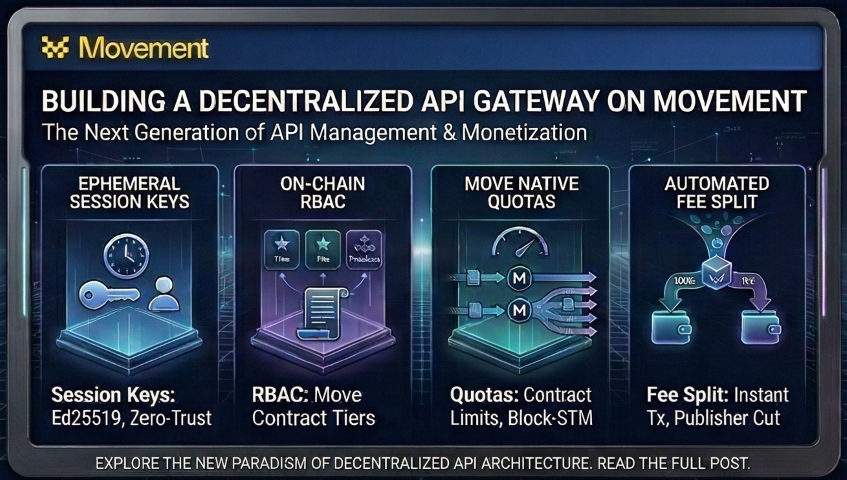
To protect the user's primary private keys while maximizing high-frequency API throughput, the system was built on four core architectural pillars:
Zero-Trust Ephemeral Keys: We completely eliminated JWTs and bearer tokens. Instead:
- The user's browser securely generates a temporary Ed25519 "session key" natively in memory.
- The user's primary wallet submits an on-chain smart contract transaction, explicitly delegating API access to this session key for a specific duration (e.g., 24 hours).
- All subsequent API requests are cryptographically signed by the session key directly from the browser.
- The Node.js backend intercepts the payload, mathematically verifies the signature using the Ed25519 standard curve, and validates the 60-second replay window.
Tiered RBAC (AuthZ): Access control is fully monetized and managed on-chain. The smart contract holds an immutable map of user addresses to a Subscription Tier resource (
0 = Free,1 = Pro,2 = Premium). The backend intercepts secure requests, queries the blockchain for this tier, and caches the result locally in a 5-minute TTL Map to prevent RPC exhaustion.On-Chain Rate Limiting & Quotas: The Move smart contract natively enforces safety limits. For Free and Pro tiers, the contract records the block timestamp of their last API call. Rapid subsequent calls trigger an immediate transaction revert. For the Premium tier, this quota check is structurally bypassed in the Move logic, allowing you to blast it with high-volume load tests to visually demonstrate Movement’s parallel transaction execution (Block-STM).
Automated Fee Split (Monetisation): When a user pays for a Pro or Premium tier in Move, the contract's deposit function automatically routes 95% to the API publisher's wallet and 5% directly to your deployer/treasury wallet. This is executed in a single, atomic transaction—guaranteeing you collect your platform cut instantly without relying on a secondary off-chain cron job.
Sequence diagram
sequenceDiagram
    autonumber
    actor UX as React Frontend
    participant Mem as Browser Memory (Ephemeral Key)
    participant Wallet as Primary Web3 Wallet
    participant Chain as Movement Blockchain
    participant Backend as Node.js API Gateway

    rect rgb(255, 255, 255)
    Note over UX, Chain: Phase 1: On-Chain Delegation (The Authorization)
    UX->>Mem: Generate volatile Ed25519 Session Keypair
    UX->>Wallet: Propose delegation transaction for specific duration
    Wallet->>Chain: Execute `authorize_session_key` Smart Contract
    Note right of Chain: Ledger strictly associates primary wallet<br/>with this Ephemeral Key for 24 hours.
    end

    rect rgb(220, 252, 231)
    Note over UX, Backend: Phase 2: Cryptographic Request (No Bearer Tokens)
    UX->>Mem: Construct message: `GET:/api/secure-data:<timestamp>`
    Mem-->>UX: Mathematically sign payload (Zero user friction/popups)
    UX->>Backend: HTTP GET w/ `x-auth-signature` and `x-auth-pubkey`
    Note right of Backend: Backend validates the 60-second execution window<br/>and mathematically verifies the Ed25519 curve.
    end

    rect rgb(255, 237, 213)
    Note over Backend, Chain: Phase 3: Hybrid State Caching
    Backend->>Backend: Check Internal TTL Cache Map
    alt Cache Miss
        Backend->>Chain: RPC Query: Read `SessionKey` & `Subscription`
        Chain-->>Backend: Return Authorized Status & Tier
        Backend->>Backend: Store Tier in 5-Minute TTL Memory Map
    end
    Backend-->>UX: 200 OK: Return Protected Data
    end
0) Scaffold Script to get started
Save this to a scaffold.sh file.
#!/bin/bash

# Exit immediately if a command exits with a non-zero status
set -e

PROJECT_NAME=${1:-movement-api-gateway}

echo "===================================================="
echo "🚀 Scaffolding Movement Monorepo: $PROJECT_NAME"
echo "===================================================="

# 1. Dependency Checks
echo "Checking dependencies..."
for cmd in node npm movement; do
  if ! command -v $cmd &> /dev/null; then
    echo "❌ Error: $cmd is not installed."
    if [ "$cmd" == "movement" ]; then
      echo "👉 Install Movement CLI: bash <(curl -fsSL [https://raw.githubusercontent.com/movemntdev/M1/main/scripts/install.sh](https://raw.githubusercontent.com/movemntdev/M1/main/scripts/install.sh)) --latest"
    fi
    exit 1
  fi
done
echo "✅ All dependencies found."

# 2. Create Monorepo Root
mkdir -p "$PROJECT_NAME"
cd "$PROJECT_NAME"

# 3. Scaffold Move Smart Contract
echo "📦 Initializing Move Smart Contract..."
mkdir -p packages/contracts
cd packages/contracts
# Initialize movement project (creates Move.toml)
movement init --name ApiGateway --assume-yes
cd ../../

# 4. Scaffold Express Backend
echo "⚙️ Initializing Node/Express Backend..."
mkdir -p packages/backend
cd packages/backend
npm init -y > /dev/null
npm install express cors dotenv @aptos-labs/ts-sdk
npm install --save-dev typescript @types/node @types/express @types/cors ts-node nodemon

# Create basic backend boilerplate
mkdir src
cat << 'EOF' > src/server.ts
import express from 'express';
import cors from 'cors';

const app = express();
app.use(cors());
app.use(express.json());

const PORT = process.env.PORT || 8080;

app.get('/api/health', (req, res) => {
  res.json({ status: 'OK', message: 'Backend is running' });
});

app.listen(PORT, () => {
  console.log(`Server running on http://localhost:${PORT}`);
});
EOF

cat << 'EOF' > tsconfig.json
{
  "compilerOptions": {
    "target": "es2020",
    "module": "commonjs",
    "outDir": "./dist",
    "rootDir": "./src",
    "strict": true,
    "esModuleInterop": true
  }
}
EOF

# Update backend package.json scripts using node
node -e "let pkg=require('./package.json'); pkg.scripts.dev='nodemon src/server.ts'; require('fs').writeFileSync('package.json', JSON.stringify(pkg, null, 2));"
cd ../../

# 5. Scaffold React Frontend
echo "🎨 Initializing React Frontend..."
cd packages
npm create vite@latest frontend -- --template react-ts
cd frontend
npm install react-router-dom @aptos-labs/ts-sdk @aptos-labs/wallet-adapter-react
cd ../../

echo "===================================================="
echo "✅ Scaffolding Complete!"
echo "===================================================="
echo "Next steps:"
echo "1. cd $PROJECT_NAME"
echo "2. Backend: cd packages/backend && npm run dev"
echo "3. Frontend: cd packages/frontend && npm run dev"
echo "4. Contracts: Write your Move logic in packages/contracts/sources"
Allow the file to be executable: chmod +x ./scaffold.sh
Run using ./scaffold.sh
What's Next?
With the monorepo fully scaffolded and our environment configured, the foundation is set.
In Part 2, we’re writing the Move smart contract that acts as the decentralized source of truth—handling tiered subscriptions, enforcing strict rate limits, and securely delegating those ephemeral session keys.
Community Discussion
0 Comments
Found this helpful?
If you enjoyed this technical tale, consider supporting my work.